
Sharing A Calendar in Outlook Web App 2013

The following article will assist the user in sharing a calendar with another user in Outlook Web App 2013.


1. Log into Outlook Web App at https://na02.msexchangeoutlook.com

2.
 Select Calendar in the top right corner.



3. 
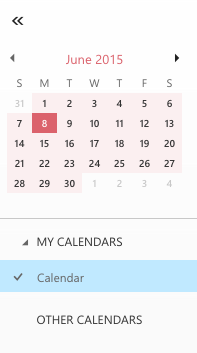
In the left-hand navigation pane, select the calendar you would like to share.


4.
 Click Share in the upper right corner.



5
. In the Share with field, enter the recipient's e-mail address.
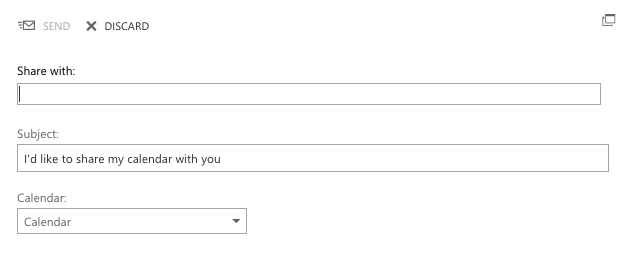


6. Select the calendar content that you would like to share.

7. Enter a Subject.

8. Click Send.
  • 0 Корисниците го најдоа ова како корисно
Дали Ви помогна овој одговор?

Понудени резултати

What’s New In Exchange 2013

Outlook Web App: Offline access   Offline access lets users write messages from their...

Recommended Browser For Outlook Web App 2013

Outlook Web App (OWA) is an excellent way to check your Microsoft Exchange e-mail from a web...

Checking the Mailbox Size In Outlook Web App 2013

If you have a Full Access or a Web Access level mailbox, you are able to check your current...

Managing Mobile Devices In Outlook Web App 2013

The following article will assist the user in accessing information regarding an ActiveSync...

Recovering a Deleted Item in Outlook Web App 2013

The following article will assist you in recovering a deleted item within OWA:      1. Log...
