
Creating An Appointment Within Outlook 2011

The following article will assist the user in creating appointments using Outlook 2011 for Macintosh. 


1. Open Outlook 2011.
2. Select the Calendar tab.
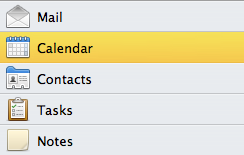


3. Select the Calendar to begin configuring the appointment. 

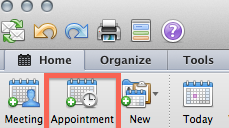
4. Select the Appointment icon. 


5. Fill in the Subject and Location of the appointment.
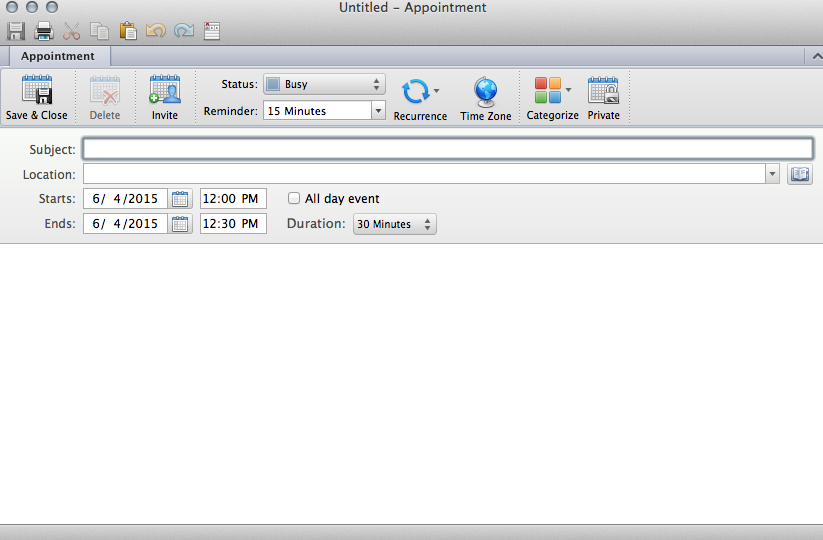


6. Make sure the appointment is on the correct day and is set to the time of your appointment.
7. Now its time to set the reminder. Click on the drop down menu and select the desired time the reminder will activate for your appointment. 
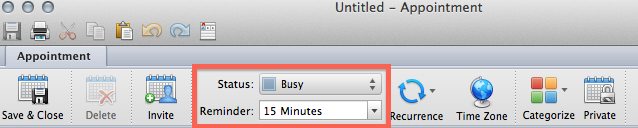


8. Select Save and Close to set your reminder.

  • 0 A felhasználók hasznosnak találták ezt
Hasznosnak találta ezt a választ?

Kapcsolódó cikkek

How to Create a Meeting in Outlook 2011

How to Create a Meeting: 1.  At the bottom of the navigation pane, Click the Calendar button....

Adding Holidays To The Outlook 2011 Calendar

The following article will assist the user in adding holidays to the Outlook 2011 calendar....

Creating Contacts Within Outlook 2011

The following article will assist the user in creating Contacts within Outlook 2011.    1....

Create, Edit, or Deleting a Task in Outlook 2011

The following article will assist the user in creating, editing or deleting a task.     1....