
How to Remove Voting Links in Emails


This article will show you how to remove the voting links at the bottom of each email.


The voting links footer can be disabled in the spam filter Quarantine Settings using the following steps:


1) Log into the CanIt portal at: https://antispam.roaringpenguin.com/canit/index.php

2) Click on Preferences.

3) Click on Quarantine Settings.
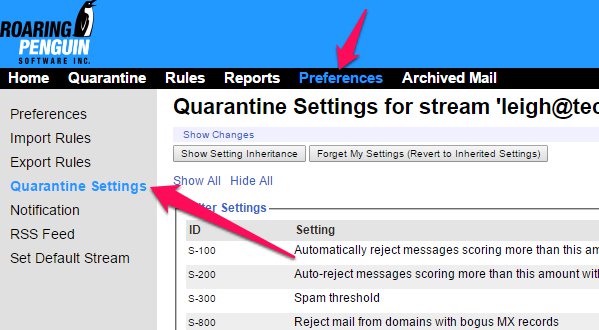


4) Under the Bayes Settings section at the bottom of the page, change the "Add links to messages to train Bayesian analyzer" to "No".

5) Click the Submit Changes button.


If you would like to apply this setting to all users in the domain, first log into the CanIt portal using the admin@domain credentials. Then click on the "Change Streams" link in the top right corner, enter "default" (without quotes), and click the View This Stream button. Any rules or preferences set under this default stream will be inherited by all users in the domain.

  • 1 Корисниците го најдоа ова како корисно
Дали Ви помогна овој одговор?

Понудени резултати

Viewing the SPAM Score of an Email

  You can view the Spam Score of any email you receive by checking that email's message headers....

Manual Bayesian Filtering

  Enabling the local Bayes training can help with filtering, but it does require active...

Reports

  The CanIt SPAM software features its own set of reporting tools, which can help determine the...

How to Bulk Add Domains or Addresses to a Blacklist/Whitelist

  If you have a large number of email addresses or domains that you would like to add to your...

Adding My Quarantine Feed to My Email

  This article will help you on how to the CanIt SPAM software stream to your Outlook or other...