
How to Bulk Add Domains or Addresses to a Blacklist/Whitelist


If you have a large number of email addresses or domains that you would like to add to your Blacklist or Whitelist, you can easily add them all at once in the CanIt portal.


1) Log in to the CanIt portal at https://antispam.roaringpenguin.com/canit/index.php

2) Click on Rules.

3) Click on Bulk Entry.
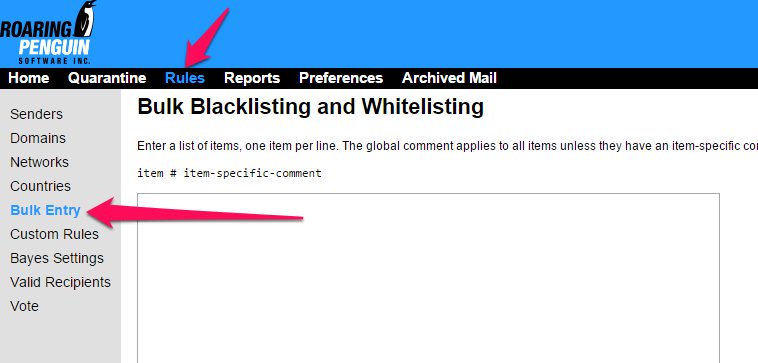


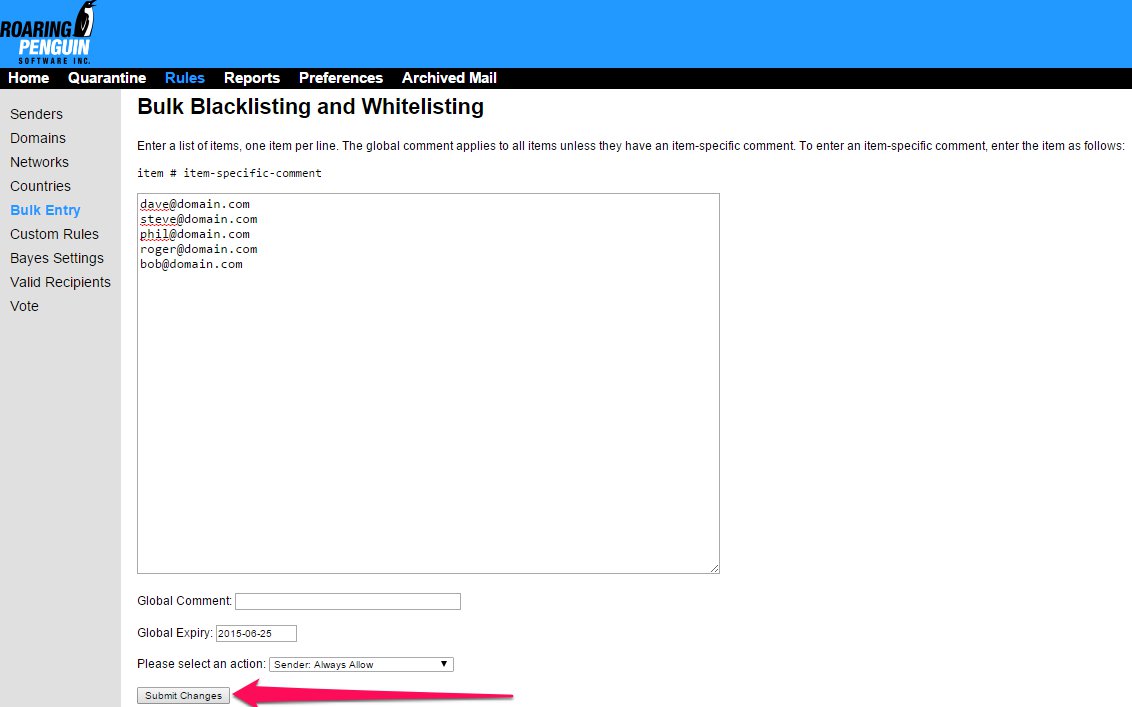
4) Paste your list of Sender email addresses or Domains into the main form box.  Please note that you cannot add email addresses and domains simultaneously, a separate list will need to be created for each.

5) Add a Global Comment to or Expiry if desired. 

6)
Select the type of object and action to be performed from the "Please select an action" menu.

7)
Click the Submit Changes button.


  • 0 Utilizadores acharam útil
Esta resposta foi útil?

Artigos Relacionados

Viewing the SPAM Score of an Email

  You can view the Spam Score of any email you receive by checking that email's message headers....

Manual Bayesian Filtering

  Enabling the local Bayes training can help with filtering, but it does require active...

Reports

  The CanIt SPAM software features its own set of reporting tools, which can help determine the...

Adding My Quarantine Feed to My Email

  This article will help you on how to the CanIt SPAM software stream to your Outlook or other...

Creating Custom Rules

  This article will help you how to create custom rules for the CanIt SPAM software....
