
How to Whitelist / Blacklist a Sender or Domain


This article will walk you through the steps on how to whitelist (always approve) or blacklist (block) a sender or domain.


1) Log in using your credentials at the provided URL:  https://antispam.roaringpenguin.com/canit/index.php
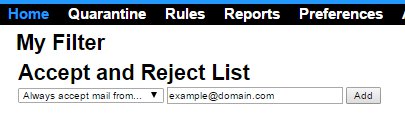
2) From the main screen, under Accept and Reject List, use the dropdown box to select whether you want to always accept mail from a sender/domain or always reject.
3) Enter the chosen sender/domain.
4) Click Add.

 

  • 1 أعضاء وجدوا هذه المقالة مفيدة
هل كانت المقالة مفيدة ؟

مقالات مشابهة

Viewing the SPAM Score of an Email

  You can view the Spam Score of any email you receive by checking that email's message headers....

Manual Bayesian Filtering

  Enabling the local Bayes training can help with filtering, but it does require active...

Reports

  The CanIt SPAM software features its own set of reporting tools, which can help determine the...

How to Bulk Add Domains or Addresses to a Blacklist/Whitelist

  If you have a large number of email addresses or domains that you would like to add to your...

Adding My Quarantine Feed to My Email

  This article will help you on how to the CanIt SPAM software stream to your Outlook or other...