
This article will walk you through how to log into the CanIt SPAM software. This will provide you access to your SPAM settings, and message quarantine.
1) Log in using your credentials at the provided URL: https://antispam.roaringpenguin.com/canit/index.php
2) Once logged in you will see your pending messages for a quick review.
3) For a more detailed view of your quarantined messages, in the top menu items, click on "Quarantine".
4) Now from the sub menu items you may select from the different categories of messages.
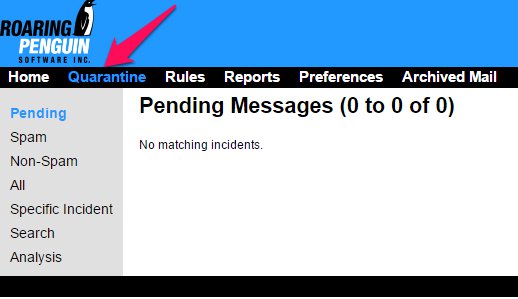
Pending - All pending filtered messages.
Spam - All messages flagged as spam by CanIt Filters.
Non-Spam - All messages flagged as not-spam but still filtered by CanIt Filters.
All - All messages filtered by CanIt.
Specific Incident - Search for a specific message filter incident.
Search - Detailed searching for messages.
Analysis - A detailed analyzed report of all SPAM filtering.
Once you have selected the appropriate message, then choose the correct disposition for the message. These options are accessed through a dropdown menu on the left side of the email:
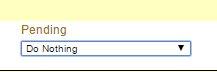
Here you can accept or reject the specified email, along with an assortment of white-list/black-list options.
To set ALL messages to accept/reject/do nothing, use the symbols near the top of the screen.
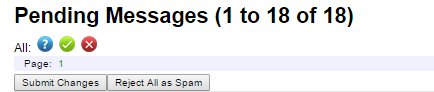
Select the Red “X” to reject all messages.
Select the Green check mark to accept all messages.
Select the Question-mark to take no action for all messages.
When you have chosen the selected action for ALL pending emails, click "submit changes" to complete the process.
