Opening And Closing A .PST File


 The following article illustrates opening an Outlook data file (.pst) using Outlook 2013.


1.
Open your Outlook 2013 Client.



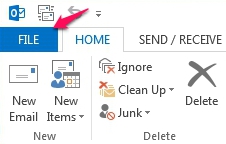
2. In the upper left corner, click on the File tab.


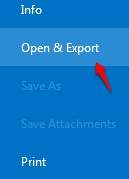
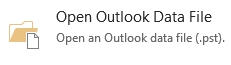
3. Under the Open & Export section, select the Open Outlook Data File Button.


4. This will open the "Open Outlook Data File" window. Brows to the location of the saved Outlook data file and double-click it. This will automatically open the data file under the Archives list within Outlook.

  • 0 Bu dökümanı faydalı bulan kullanıcılar:
Bu cevap yeterince yardımcı oldu mu?

İlgili diğer dökümanlar

Archiving In Outlook 2013

  Archiving is a good way to backup older mailbox data and reduce overall mailbox quota. The...

Exporting Your Mailbox In A .PST File

  Exporting your mailbox is a good way to backup your mailbox data and reduce overall mailbox...

Importing a .PST File Into Outlook 2013

  This article illustrates how to import an Outlook data file (,pst) into your Microsoft...

Configuring AutoArchive Settings in Outlook 2013

  AutoArchive moves items from their original location in Outlook to an archive file folder when...

Microsoft Outlook Inbox Repair Tool

The following article describes how to use the inbox repair tool. It can find and repair errors...