
This article illustrates how to import an Outlook data file (,pst) into your Microsoft Exchange mailbox using Outlook 2013.
1. Open your Outlook 2013 Client.

2. In the upper left corner, click on the File tab.

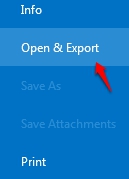
3. Under the Open & Export section, select the Import/Export Button.
|
|
|

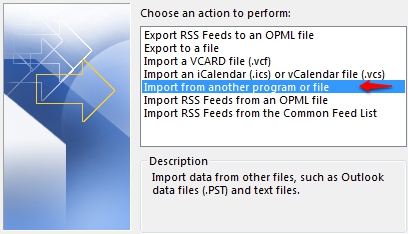
4. This will open the Import and Export Wizard. Click on "Import from another program or file" and click Next.
5. Next choose Outlook Data File (.pst) as the file type and click Next.

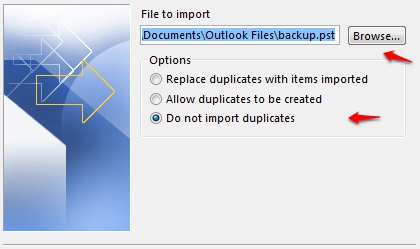
6. Click Browse to select the location of the file to be imported and confirm the option "Do not import duplicate items" is selected. Click Next.
7. You will now need to select folder(s) to be imported. We recommend highlighting the top most folder within the list. This is typically the mailbox or account name. Ensure the check box labeled "Include Subfolders" is selected as well as checking the option "Import items into same folder in:" and chose the account the data will be imported into. click Finish.

Note: Although it may look as though it was completed in less than 1 minute, it may take a significant amount of time to upload the data to the Exchange Server. Please do not close Outlook or disconnect your computer from the internet for approximately two hours or more depending on the .PST file size.
