
Creating a Meeting on Behalf of Another User.

The following article illustrates how a delegate can create a meeting event on behalf of another user. This prevents adding the delegate to the scheduled meeting.
Note: Delegate access permission must be set using Outlook before the following actions can be performed.


1. Open your Outlook 2013 Client.


2.
Click the Calendar button located in the bottom left corner of Outlook.



3. Once the ribbon has adjusted to reflect calendaring options, select Open Calendar, then Open Shared Calendar.
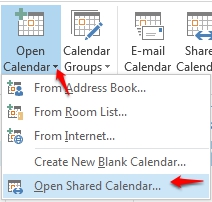
 

4. Select the person, from Global Address List, that has provided you delegate access to open their calendar. The calendar will be displayed under Shared Calendars.


5. Dependent on the assigned delegate permissions, you can now select the Shared Calendar to Create, Edit, or Remove on behalf of the original calendar owner.


Note: Creating a meeting on behalf of another will not include the delegate, within the invitation, as an attendee by default. Additionally, all created items will reflect the current calendar owner as the Meeting Organizer.

  • 0 användare blev hjälpta av detta svar
Hjälpte svaret dig?

Relaterade artiklar

How to Download the Offline Address Book

  The following article contains the preferred instructions on how to download your Global...

Scheduling A Meeting

Scheduling a meeting is a great way to keep your team up to date on business events. Outlook...

Changing The Default Address List used by Outlook 2013

When you use Outlook 2013, with an Exchange account, the default address list is set to the...

Making Appointments/Meetings Private

  This article will assist you on how to make a meeting or an appointment private. Note: Making...

Responding to a Mesasge with a Meeting Request

  When you receive a message, task request, or calendar invitation, you are able to respond with...