
Note: Delegate access permission must be set using Outlook before the following actions can be performed.
2. Click the Calendar button located in the bottom left corner of Outlook.

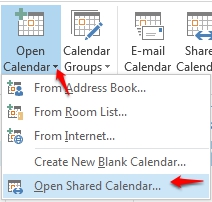
3. Once the ribbon has adjusted to reflect calendaring options, select Open Calendar, then Open Shared Calendar.
5. Dependent on the assigned delegate permissions, you can now select the Shared Calendar to Create, Edit, or Remove on behalf of the original calendar owner.
Note: Creating a meeting on behalf of another will not include the delegate, within the invitation, as an attendee by default. Additionally, all created items will reflect the current calendar owner as the Meeting Organizer.