
Opening A Shared Mailbox In Outlook Web App 2013

The following article will assist the user in opening a shared mailbox in OWA provided the user has been given access to another user's mailbox.


1. Log into Outlook Web App at http://na02.msexchangeoutlook.com

2. In the upper right hand corner select the drop-down arrow next to your display name to pull up the "Open Other Mailbox" window.
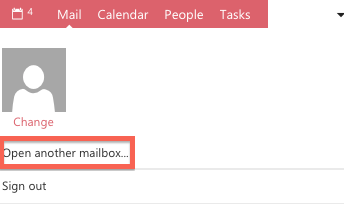


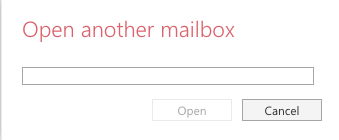
3. Type in the first few letters of the display name of the mailbox you wish to open. Once you have located the mailbox select it and click Open. If the mailbox does not open, confirm you have the proper permissions.
  • 0 utilizatori au considerat informația utilă
Răspunsul a fost util?

Articole similare

What’s New In Exchange 2013

Outlook Web App: Offline access   Offline access lets users write messages from their...

Recommended Browser For Outlook Web App 2013

Outlook Web App (OWA) is an excellent way to check your Microsoft Exchange e-mail from a web...

Checking the Mailbox Size In Outlook Web App 2013

If you have a Full Access or a Web Access level mailbox, you are able to check your current...

Managing Mobile Devices In Outlook Web App 2013

The following article will assist the user in accessing information regarding an ActiveSync...

Recovering a Deleted Item in Outlook Web App 2013

The following article will assist you in recovering a deleted item within OWA:      1. Log...
