
How To Import A Mailbox Using Outlook 2011

This article will assist the user in importing the contents of an Exchange mailbox.


1. In Outlook 2011, select File > Import / Export.


2. Select Outlook Data File (.pst or .olm). Click Next.
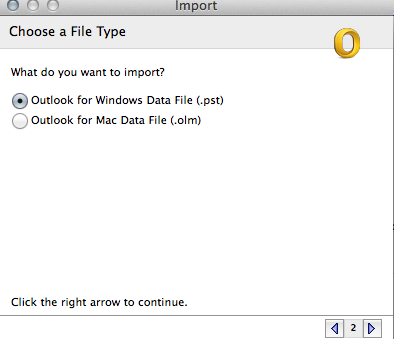


3. Choose either Outlook for Windows data file (.pst) or Outlook for Mac Data file (.olm) Then Select next.

4. Locate the file you wish to import and click Import.

5. Once Outlook 2011 has finished importing, select done.

  • 0 Els usuaris han Trobat Això Útil
Ha estat útil la resposta?

Articles Relacionats

How To Export A Mailbox Using Outlook 2011

This article will assist the user in exporting the contents of an Exchange mailbox. 1. In...