
Setting A Reminder In Outlook


There is a simple and easy way to set reminders in Outlook. The illustrated instructions will show you how.


1.
Open your Outlook 2013 Client.


2. Click the Calendar button located in the bottom left corner of Outlook.



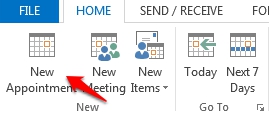
3. Once the ribbon has adjusted to reflect calendaring options, select New Appointment.


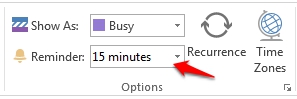
4. In the Options group, click the reminders drop-down menu and enter the amount of time you wish the reminder to alert you prior to the set appointment time.


5. Click Save and Close.

  • 0 Os usuários acharam isso útil
Esta resposta foi útil?

Artigos Relacionados

How to Download the Offline Address Book

  The following article contains the preferred instructions on how to download your Global...

Scheduling A Meeting

Scheduling a meeting is a great way to keep your team up to date on business events. Outlook...

Creating a Meeting on Behalf of Another User.

The following article illustrates how a delegate can create a meeting event on behalf of another...

Changing The Default Address List used by Outlook 2013

When you use Outlook 2013, with an Exchange account, the default address list is set to the...

Making Appointments/Meetings Private

  This article will assist you on how to make a meeting or an appointment private. Note: Making...