
Requesting A Read or Delivery Receipt


A read receipt or delivery receipt is an email notification delivered when a recipient receives, opens (and presumably reads) an email you have sent. The receipt service confirms that the message was delivered to the recipient as well as saw your message and records the date/time the message was delivered/read and a notification is sent back.

Please Note: Not all E-mail providers have the Read Receipts service enabled and is the sole responsibility of the recipient’s service provider to generate and sent the return notification.


1.
Open your Outlook 2013 Client.


2. In Outlook, create a new Email by pressing the New Email button.


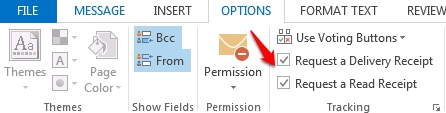
3. Click the Options tab, located in the ribbon, and check box next to the Receipt you wish to request.


4. Compose and send your email to submit the receipt request.

  • 3 Kasutajad peavad seda kasulikuks
Kas see vastus oli kasulik?

Seotud artiklid

Outlook 2013 System Requirements

  The following are the minimum system requirements for Outlook 2013. Processor 1...

Outlook 2013 Command Line Switches

  Outlook Command Line Switches may be used to clear errors within Outlook caused by...

The Difference Between 32-bit And 64-bit Versions Of Outlook 2013

  What are the differences between the 32-bit and 64-bit versions of Microsoft Office Outlook...

What's New in Microsoft Outlook 2013

  Would you like to view some of the features included with the newly released version of...

Microsoft Exchange 2013 NDR - Non-Delivery Reports

  Are you receiving a Bounce back (NDR - Non-Delivery Report) when sending an email message? We...